The WD9541 weather station from La Crosse Technology receives its forecasts via radio signal, based on data compiled by Météo-France. When the display freezes, icons disappear, or synchronization with the outdoor sensor fails, resetting remains the first course of action. The official manual describes a basic procedure, but user feedback on specialized forums reveals additional steps without which the reset often remains ineffective.
Power-up sequence for the WD9541: the point the manual does not detail
The La Crosse Technology documentation indicates to remove the batteries and then replace them. This minimal instruction overlooks a crucial parameter: the order in which each component is powered back on.
Users sharing their field experiences on dedicated groups converge on a specific sequence. It differs significantly from a simple battery removal and replacement.
- Remove the batteries from both the base station AND the outdoor sensor simultaneously, to cut off any residual power in both devices.
- Wait several minutes before any manipulation, so that the internal capacitors fully discharge and the volatile memory is cleared.
- Power on the base station first, and only then the outdoor sensor, so that the base initiates the pairing protocol in receiver mode.
Reversing this order (powering the sensor before the base) frequently results in synchronization failure. The sensor emits its pairing signal during a limited window after being powered on. If the base is not yet ready to receive this signal, the connection does not establish.
Several users have also noted that it is preferable to remove all external sensors (not just the problematic one) before proceeding with the reset, to avoid channel conflicts during re-pairing. This practical detail is particularly relevant for those who have added additional probes to their setup.
To delve deeper into each step of this procedure, a comprehensive guide allows you to reset the La Crosse Technology WD9541 weather station by following an illustrated procedure.

Radio synchronization and delay in receiving weather forecasts
The WD9541 is a radio-controlled station: it receives weather forecasts via radio signal, developed from Météo-France data and digitally compiled for display. After a reset, the station must reacquire this signal. The manual indicates a delay of up to six hours before fully receiving the forecasts after setting the department.
This delay often surprises users, who interpret the absence of weather icons as a reset failure. In reality, the station is simply waiting for the next broadcast window of the signal. Cutting power during this waiting phase resets the counter to zero, worsening the situation.
Factors that disrupt signal reception
The quality of reception depends on the physical location of the station. Positioning it near electronic devices (screens, Wi-Fi routers, microwaves) generates interference that can block the reception of the radio signal.
User feedback varies on this point: some users achieve synchronization in less than an hour, while others wait the entire announced delay. The density of buildings, wall thickness, and distance from the regional transmitter play a role, but no precise technical data is published by La Crosse Technology regarding the exact range of the signal for this model.
Recurring display loss: diagnose before resetting
A reset resolves most software issues (display freeze, loss of sensor synchronization, frozen icons). However, it does not fix a hardware defect. Before proceeding with a reset, a few checks can help distinguish between the two cases.
The first reflex concerns the batteries. Weak batteries cause erratic behavior well before complete shutdown: partial display, outlier values, intermittent disconnection from the sensor. Replacing the batteries with new ones is a prerequisite for any reset, not an optional step.
The second point concerns the outdoor sensor itself. On the Infoclimat forums, several owners of La Crosse Technology stations report display losses related to oxidation of the battery compartment contacts of the sensor, especially after a wet winter. Cleaning the contacts with isopropyl alcohol sometimes restores the connection without the need for a reset.
When the reset is not enough
If after a complete reset (with adherence to the power-up order), the outdoor sensor remains invisible to the base for several hours, the problem is likely hardware-related. The radio components of sensors from this generation have a limited lifespan, and a faulty sensor generally cannot be repaired.
La Crosse Technology offers compatible replacement sensors, but availability varies by model. The WD9541 is part of an older range, and spare parts are not always in stock.
Home weather station and monitoring extreme temperatures
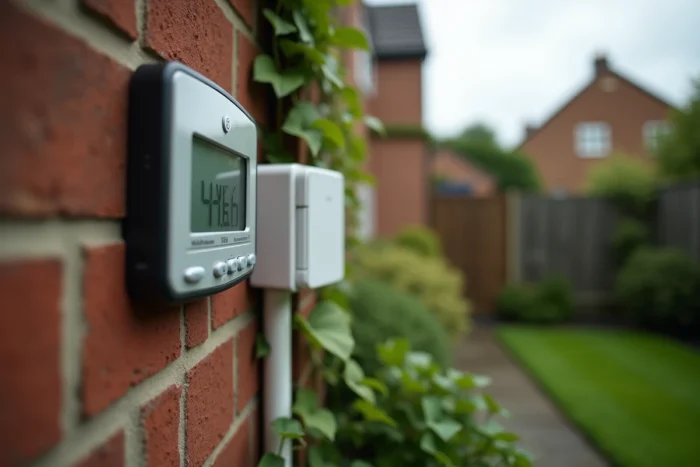
The reliability of measurements after a reset takes on practical significance beyond mere comfort. Decree No. 2025-482 of May 27, 2025, strengthens the protection of workers against extreme weather conditions, providing for adjustments to work rhythms based on temperatures recorded on site.
This text does not mention home weather stations. However, in practice, some small organizations use consumer devices like the WD9541 to monitor outdoor temperatures and trigger protective measures. A poorly synchronized station displays outdated or incorrect data, which skews decisions made on this basis.
For users relying on their station in a semi-professional context, checking proper synchronization after every power cut (even unintentional, such as a power outage if the station is plugged into mains with a backup battery) becomes a useful precaution. Simply verifying that the displayed temperature matches that reported by Météo-France for your department is enough to validate proper functioning post-reset.